Set up contact lookup for Telegram users
Docs · Set up contact lookup for Telegram users
Last updated July 28, 2026
When a Telegram user sends their first message to a connected Telegram bot, Interchat needs an Intercom contact for that user. By default, Interchat creates a new Intercom contact and links it to the Telegram user. Future messages from the same Telegram user use that saved link.
Contact lookup lets Interchat reuse an existing Intercom contact instead of creating a new one. This is useful when you already have customer records in Intercom and want new Telegram conversations to appear under those records.
How contact lookup works
When contact lookup is enabled for a Telegram bot:
- A Telegram user sends a message to the bot.
- Interchat checks whether that Telegram user is already linked to an Intercom contact.
- If no link exists yet, Interchat searches Intercom for a contact with a matching
telegram_user_idcustom attribute. - If Interchat finds a matching contact, it links the Telegram user to that contact.
- If Interchat does not find a matching contact, it creates a new Intercom contact.
Contact lookup runs only before Interchat creates the first local link between the Telegram user and an Intercom contact. After the link exists, Interchat uses the saved link for future messages.
Before you start
Make sure you have:
- a Telegram bot connected to Interchat
- existing Intercom contacts that should be reused
- the numeric Telegram user ID for each contact you want to match
- the Telegram bot name or username, so Interchat support can enable contact lookup for the correct bot
Telegram does not provide a phone number or email address by default, so Interchat does not match contacts by phone number, email address, or Telegram username. The lookup uses the numeric Telegram user ID.
Prepare existing Intercom contacts
For each existing Intercom contact you want Interchat to reuse, add a contact custom attribute named telegram_user_id.
Set the attribute value to the customer's numeric Telegram user ID. The value must match the Telegram user ID exactly.
If the custom attribute is not available yet, create it in Intercom as a contact custom attribute before adding values.
If the custom attribute already exists, you can find it in the Intercom Inbox right-side Details panel:
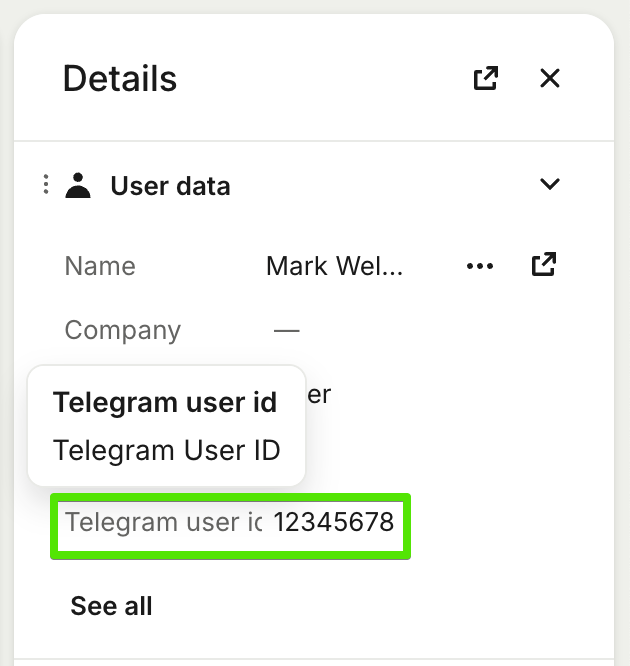
Keep telegram_user_id unique. If multiple Intercom contacts have the same telegram_user_id, Interchat uses the first matching contact returned by Intercom.
Enable contact lookup
Contact lookup is disabled by default. To enable it, contact support@interchat.io and include:
- your Intercom workspace name or ID
- the Telegram bot name or username
- confirmation that existing contacts have the
telegram_user_idcustom attribute
Test the setup
Use a Telegram user that has not messaged the connected bot before. If the user is already linked to an Intercom contact in Interchat, contact lookup will not run for that user.
- Add the user's numeric Telegram user ID to the existing Intercom contact as
telegram_user_id. - Confirm that contact lookup is enabled for the Telegram bot.
- Send a new message from that Telegram user to the bot.
- Open the conversation in Intercom.
- Check that the conversation is attached to the existing Intercom contact, not a newly created contact.
Supported channels
Contact lookup is available for Telegram bots only. It is not available for Telegram accounts.
Performance
Contact lookup can add a few extra seconds to the first message from a Telegram user. After Interchat resolves and links the contact, the chat experience works at normal speed.
Troubleshooting
Interchat created a new contact instead of reusing an existing contact
Check that contact lookup is enabled for the Telegram bot and that the existing Intercom contact has the correct telegram_user_id value.
Also check whether the Telegram user had already messaged the bot before the attribute was added. If Interchat already created a local link, later changes to telegram_user_id will not automatically move that Telegram user to another Intercom contact.
The wrong Intercom contact was reused
Check for duplicate telegram_user_id values in Intercom. Each Telegram user ID should belong to only one Intercom contact.
The existing contact still is not found
Make sure the Intercom contact has the same contact role that Interchat uses for the Telegram bot. For most Telegram bot setups, Interchat creates and searches for Intercom users.